

Building a clearer, more engaging product experience for a movement-based corporate wellbeing platform.

UPNDO is a corporate wellbeing platform that connects physical activity, employee engagement, and social impact.
The product already had a lot to offer. Users could track their activity, join challenges, support causes, and interact with their organization. But as I looked through the existing experience, I found that some of these features felt disconnected, making parts of the product harder to understand and navigate than they needed to be.
I focused on identifying where users were experiencing unnecessary friction and finding ways to make the overall experience clearer and more engaging. I also wanted to create a stronger foundation for the social and community features that were being planned for the product.I approached the redesign around three main goals:
Reduce friction
Make it easier for users to get into the product and complete the actions that matter most.
Increase clarity
Create a clearer hierarchy so users can quickly understand where they are, what they are seeing, and what they can do next.
Strengthen engagement
Make movement, community participation, and real world impact feel more visible and rewarding.
Before redesigning the product, I spent time going through the existing app and looking at how the different parts of the experience worked together.
I mapped recurring usability and visual patterns across the main user journey to understand where things were working well and where users might run into friction.
The goal wasn’t just to make the interface look more modern. I wanted to understand where the experience could feel confusing, overwhelming, or unclear, especially when users were trying to figure out what to do next.
Too many steps before users reached the core experience.
Too many competing elements and similar visual treatments.
Users weren't always sure what to look at or do next.
The product had strong social and impact mechanics, but they weren't always surfaced at the right moment.
The existing onboarding included a Welcome screen, a UPNDO Pledge step, and 12 introductory screens explaining different parts of the product.
Each screen had useful information, but there was a lot of it. Users had to go through several steps before they could actually start using the app, which made the first experience feel longer and more demanding than it needed to be.
I also noticed some visual inconsistencies along the way, including content being partially cropped at the top of certain screens.

The onboarding communicated a lot of information, but required users to consume it before they had experienced the product itself.
The question wasn't whether the information was useful.
It was when the user needed to learn it.
Instead of asking users to understand the entire product upfront, I proposed separating value proposition from product education.
I simplified the onboarding into a small number of screens built around three ideas:
Move -> Connect -> Create Impact
Rather than asking users to read through a long series of introductory screens, the new experience gives them just enough context to get started. The goal was to let users understand how UPNDO works by using the product, instead of explaining everything upfront.
This also meant simplifying the structure of the onboarding and using more intuitive UI patterns to make the experience easier to follow.
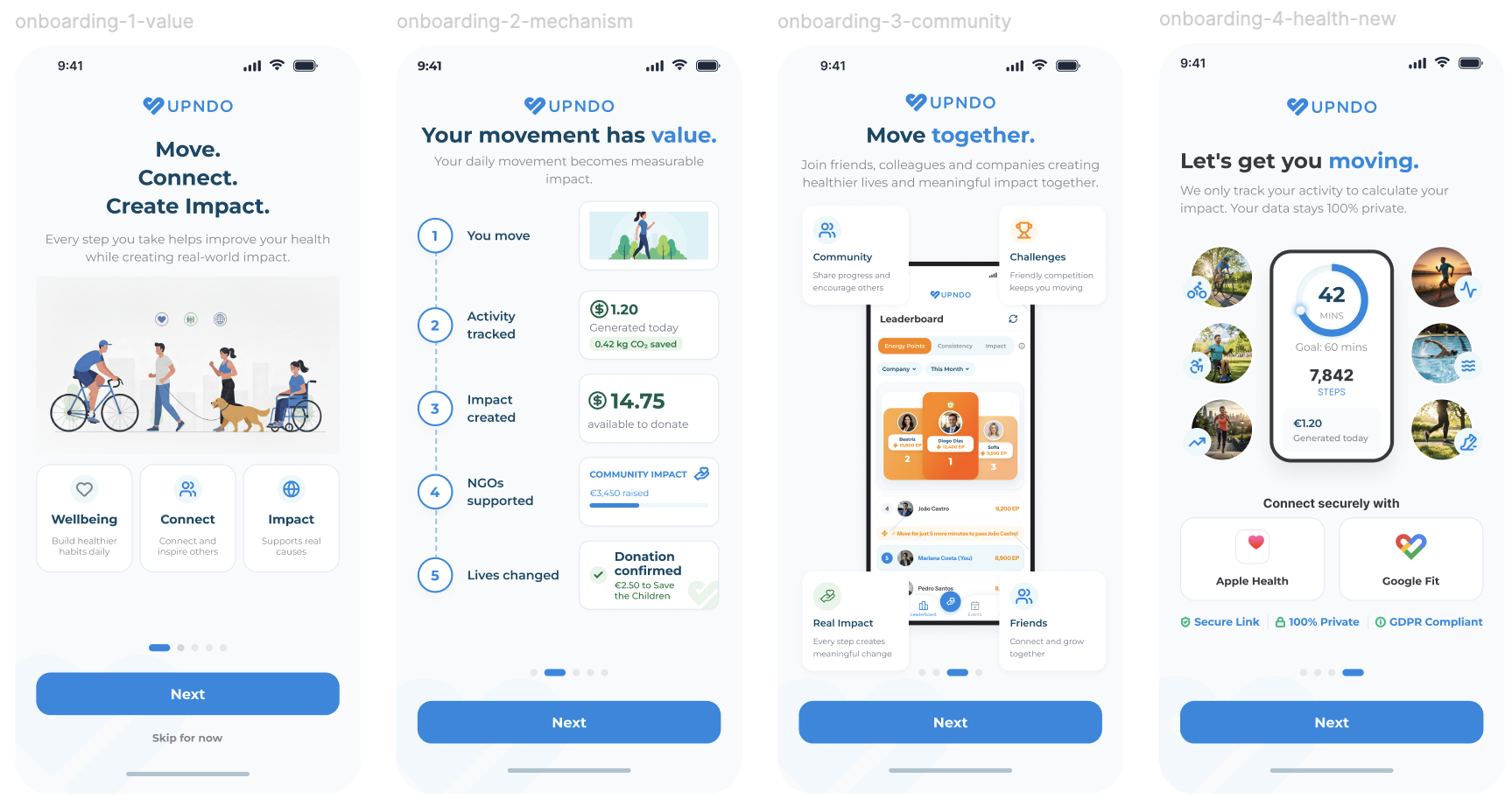
Don't make users learn the product before they can experience its value.
The Home screen is one of the most important parts of UPNDO. It brings together activity, progress, impact, and engagement, but in the existing experience, these elements competed for attention.
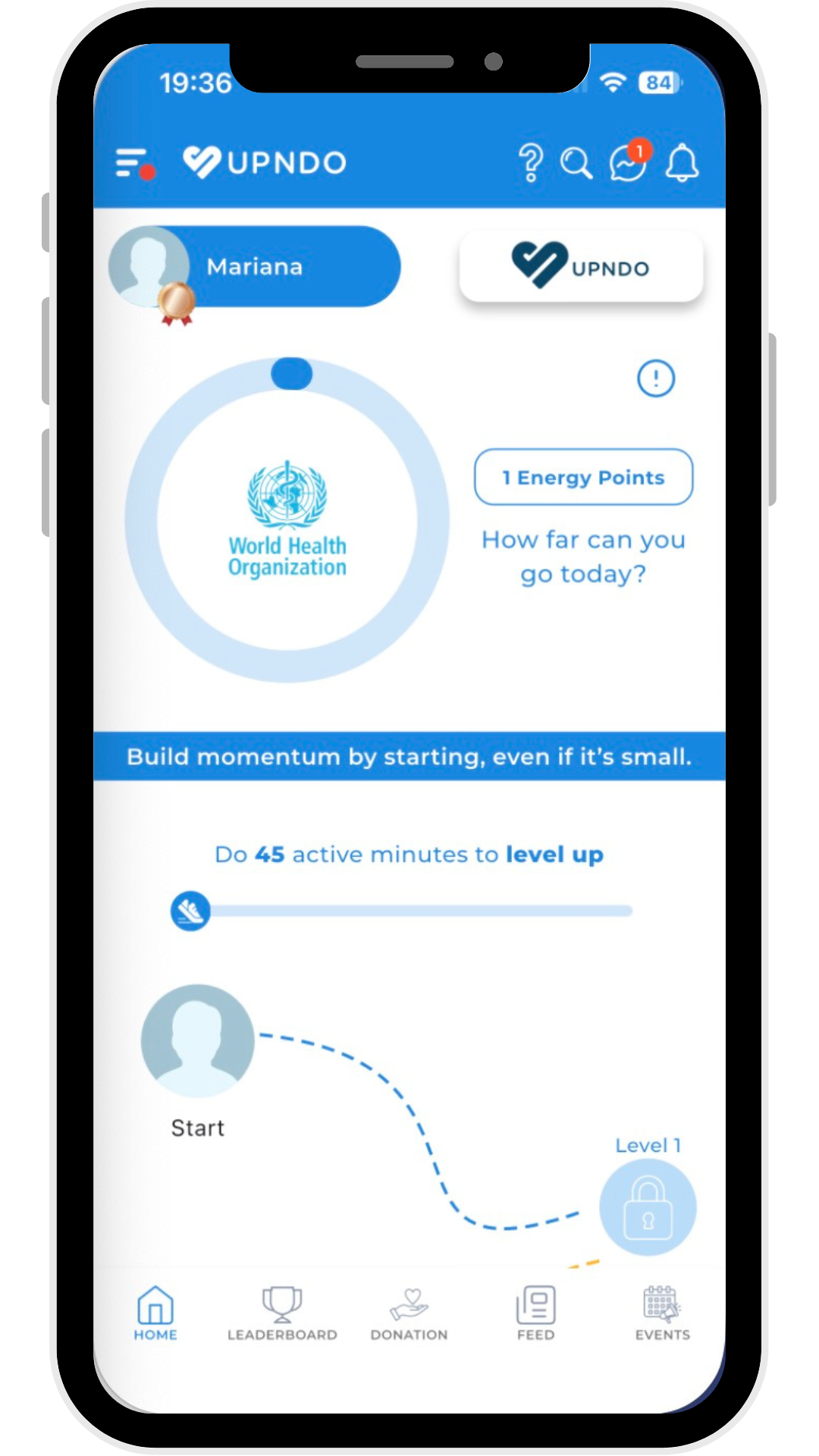
Multiple cards, progress elements, and metrics had similar visual weight, making it difficult to quickly understand:
• Where am I?
• What have I accomplished?
• What should I do next?
• What impact am I creating?
UPNDO also had a community feed where users could see their colleagues’ posts, activities, and achievements, but it lived on a separate page.
This created a disconnect between two important parts of the experience:
My activity -> My community
Users had to intentionally navigate away from Home to see what others were doing, making the community experience feel separate from their everyday activity.
I saw an opportunity to make Home clearer, more intentional, and more connected to the community.
First, I reorganized the experience around a clearer daily hierarchy:
Where am I? -> What have I accomplished? -> What can I do next?
Then, instead of treating the community as a separate destination, I integrated the existing feed directly into Home.
This allowed Home to evolve from a dashboard focused primarily on individual metrics into a space where users could also discover what was happening around them and feel more connected to their community.
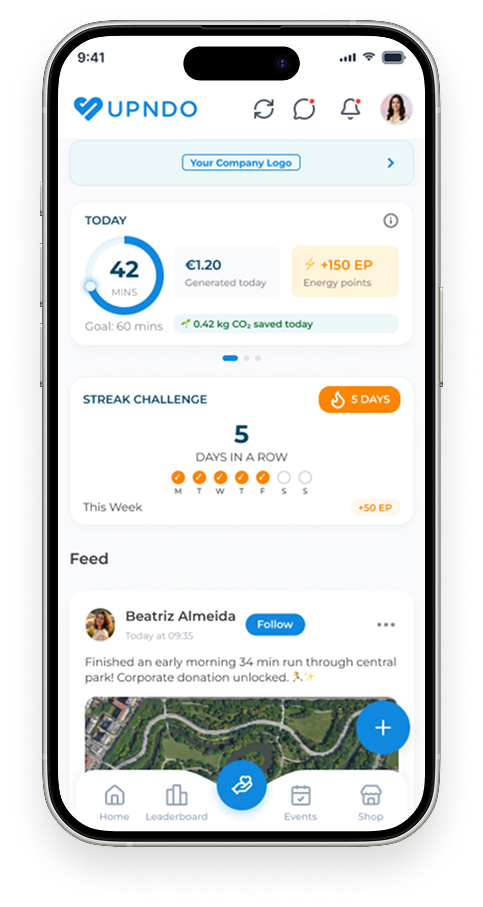
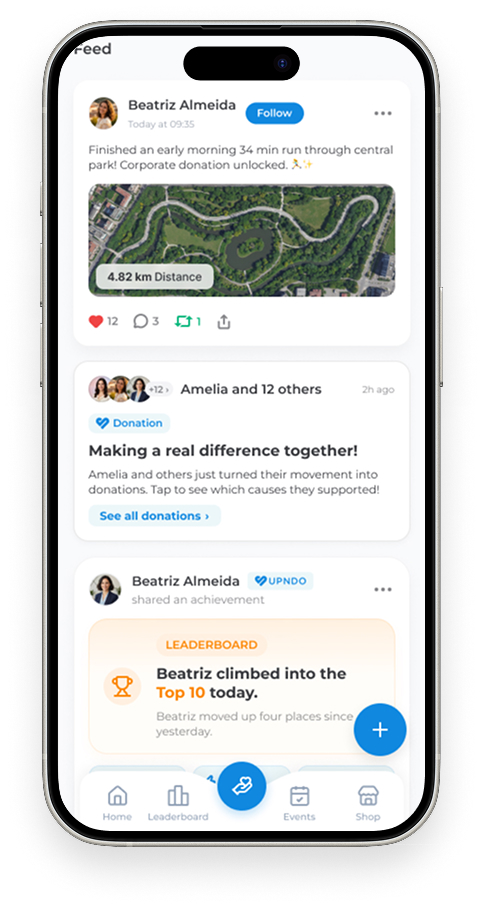

The redesigned Home brings personal progress and community activity together in one place:
• Activity and progress
• Colleagues’ posts
• Achievements and milestones
• Challenges and participation
• Community impact
The new hierarchy makes the most important information and actions easier to find, while making the relationship between movement, progress, and impact more visible throughout the experience.
Home is no longer just a place to check personal metrics. It also gives users a clearer view of what is happening in their community and how their own activity contributes to something bigger.
The feed is no longer something users have to seek out.
Before: “I want to see what the community is doing.” → Navigate to the Feed.
After: “I'm checking my progress.” → Discover the community naturally.
This creates a stronger loop: Check in -> Discover -> Get inspired -> Take action -> Share
The Leaderboard already had a strong gamification foundation.
The podium treatment gave the experience a sense of competition, but there were opportunities to make the ranking more meaningful.
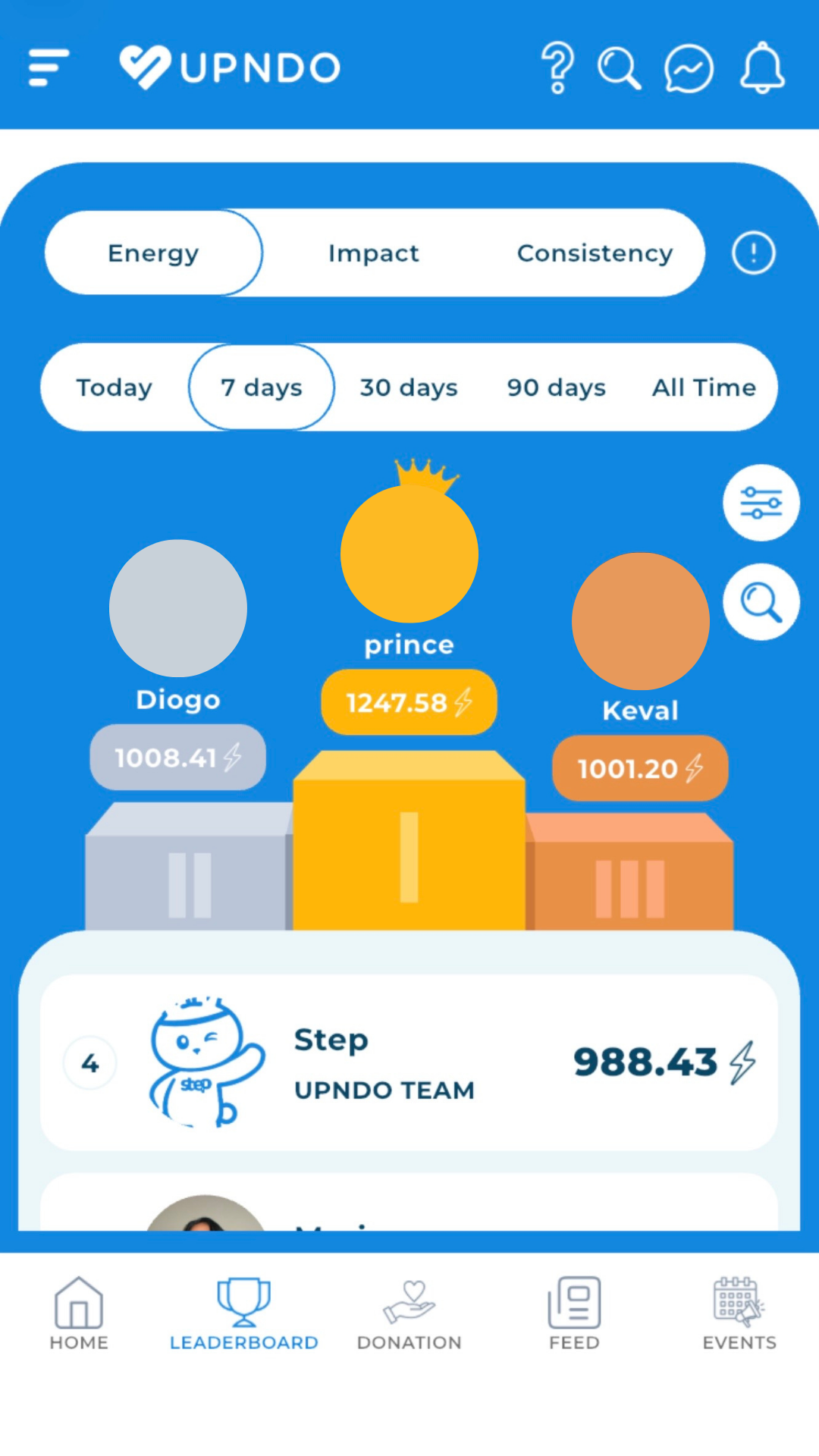
One opportunity I identified was the amount of screen real estate dedicated to certain elements of the leaderboard and filters.
The result was that less space was available for the part of the experience users were actually there to explore:
The people, rankings and activity happening around them.
Rather than simply reducing the amount of content, I looked at how the available space could be used more effectively. There was an opportunity to:
• Show more people in the ranking
• Give users more visibility into their colleagues’ activity
• Surface more useful ranking information
• Add more social and engaging elements
The goal was to make the leaderboard feel less like a static scoreboard and more like a dynamic social space where users could see what others were doing and feel motivated to take part.
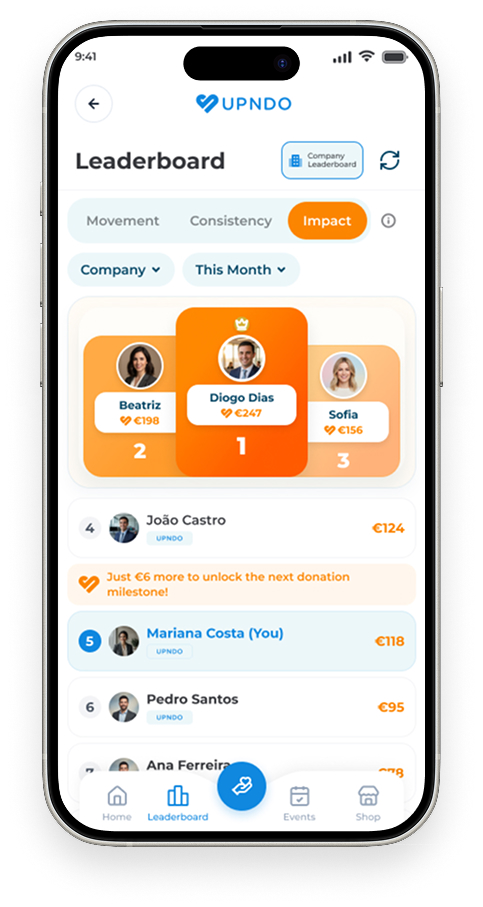
The redesign makes better use of the available space, giving more room to showcase colleagues, rankings, and social interactions.
I also explored how the leaderboard could make competition feel more actionable.Instead of simply telling users:
“You’re #12”
the experience gives them a clear and achievable next step:
“Move for just 5 more minutes to pass João Castro!”
Rather than focusing on the distant goal of “Become #1,” users can focus on something that feels much more immediate: beating the person just ahead of them.
This turns the leaderboard from a simple scoreboard into a more active part of the experience, giving users a reason to discover, compare, and take action.
The donation experience connects an activity metric to something users can actually see and understand. Instead of movement feeling like just another number, users can see how their activity contributes to a real world outcome.
That connection is an important part of what makes UPNDO different.
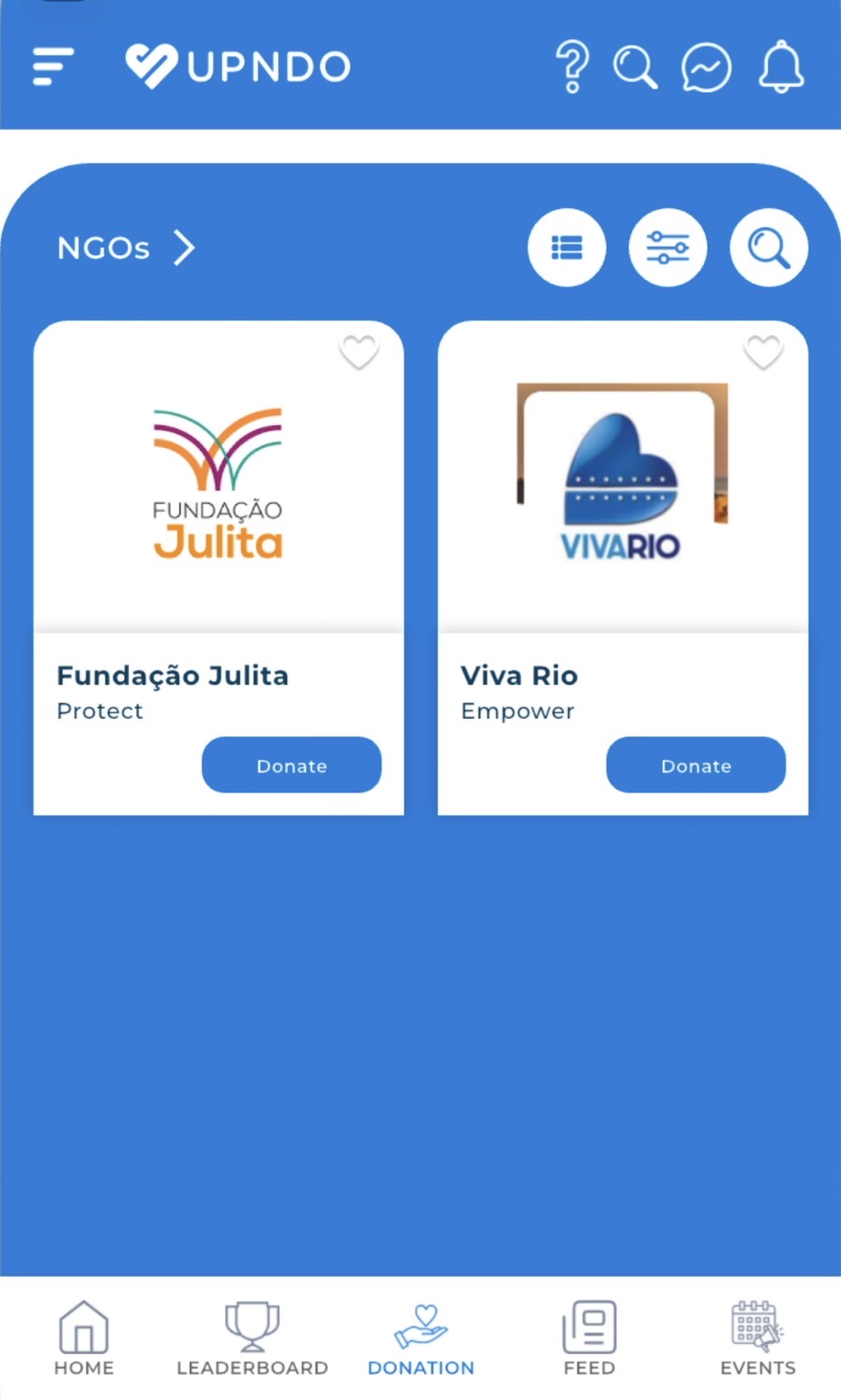
During the audit, I identified opportunities around:
• CTA visibility
• Information hierarchy
• Favorite interactions
• Visual affordance
• Card consistency
• Supporting metadata.
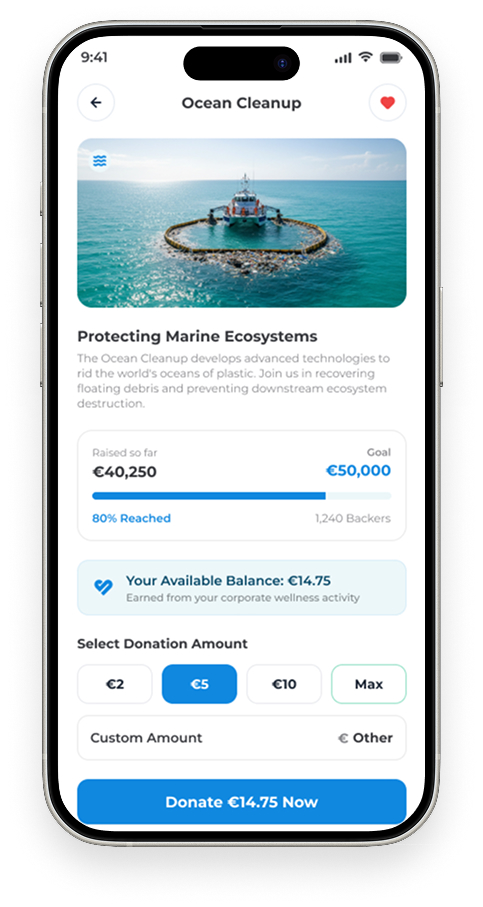
The donation experience should answer three questions immediately:
• What is this cause?
• What impact can I make?
• What should I do next?
The redesign prioritizes:
Cause -> Impact -> Progress -> Action
This makes the path from discovering a cause to taking action more direct.
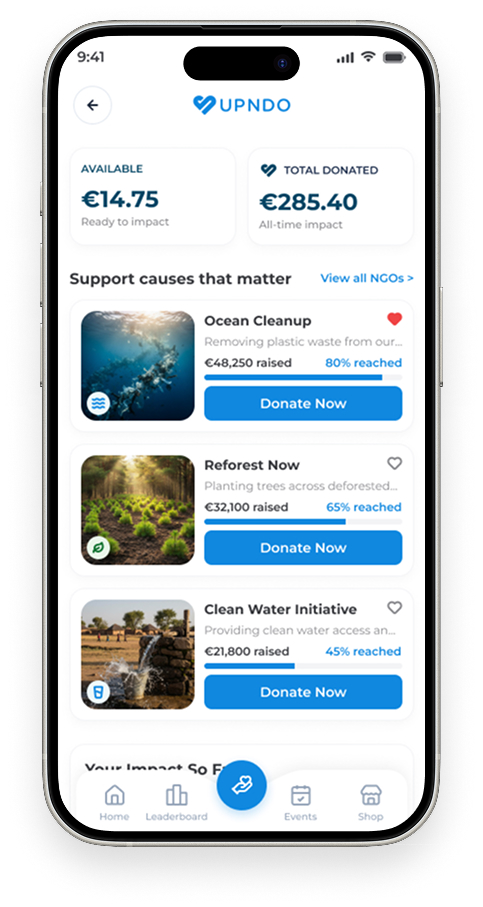

The individual cause detail screen highlighted the same hierarchy challenge.
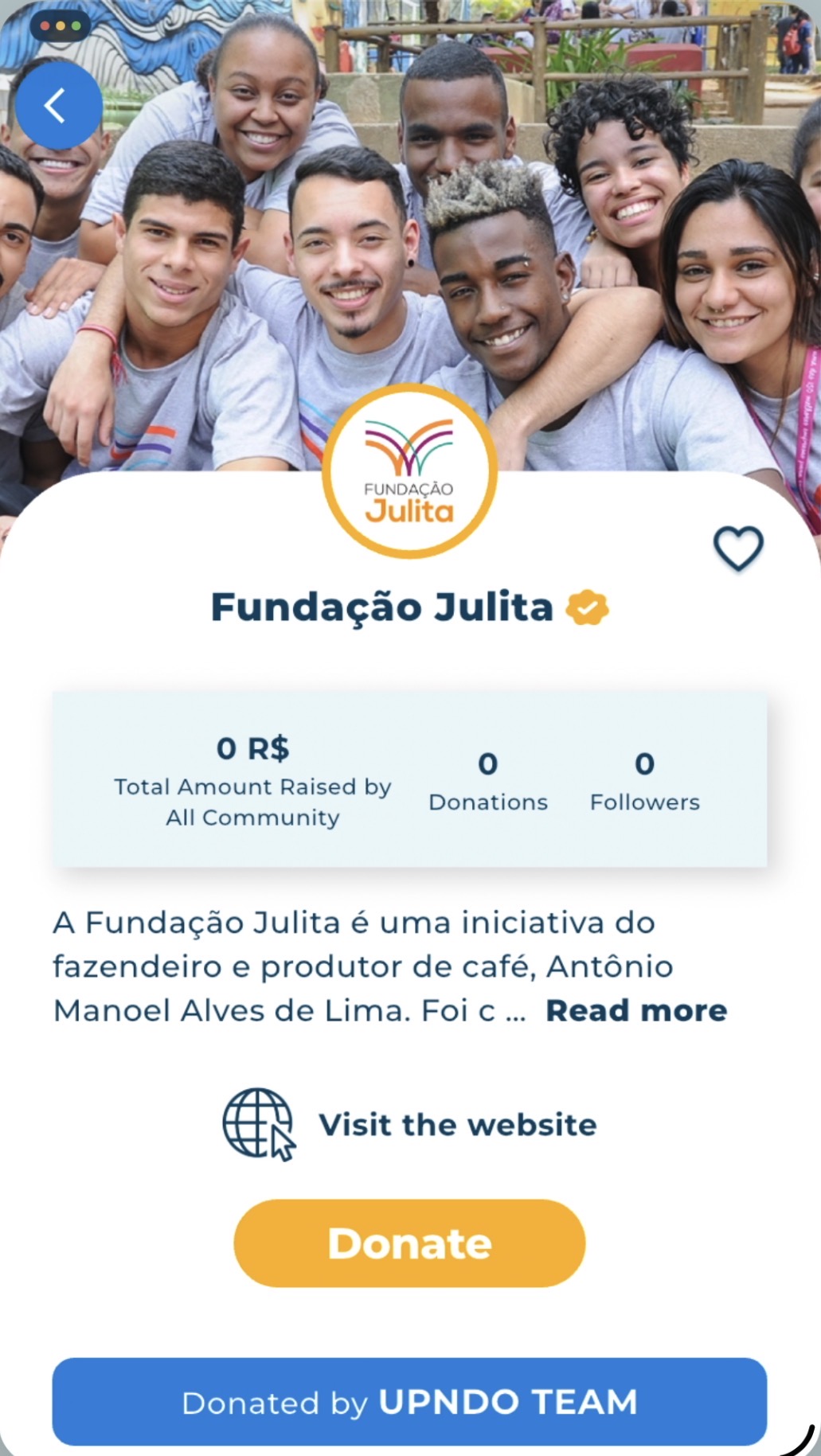
The screen contained valuable information, but several elements competed for similar visual attention.
NGO information, progress indicators, supporting information and actions did not always have a consistent hierarchy.
I reorganized the experience around a clearer narrative:
Cause -> Impact -> Progress -> Details -> Action

The redesign standardizes:
• NGO identity
• Progress visualization
• CTA hierarchy
• Typography
• Supporting information
• Spacing
The result is intended to feel less like a data sheet and more like an impact story that naturally leads to action.
If community becomes part of the Home experience, creating content should feel effortless.
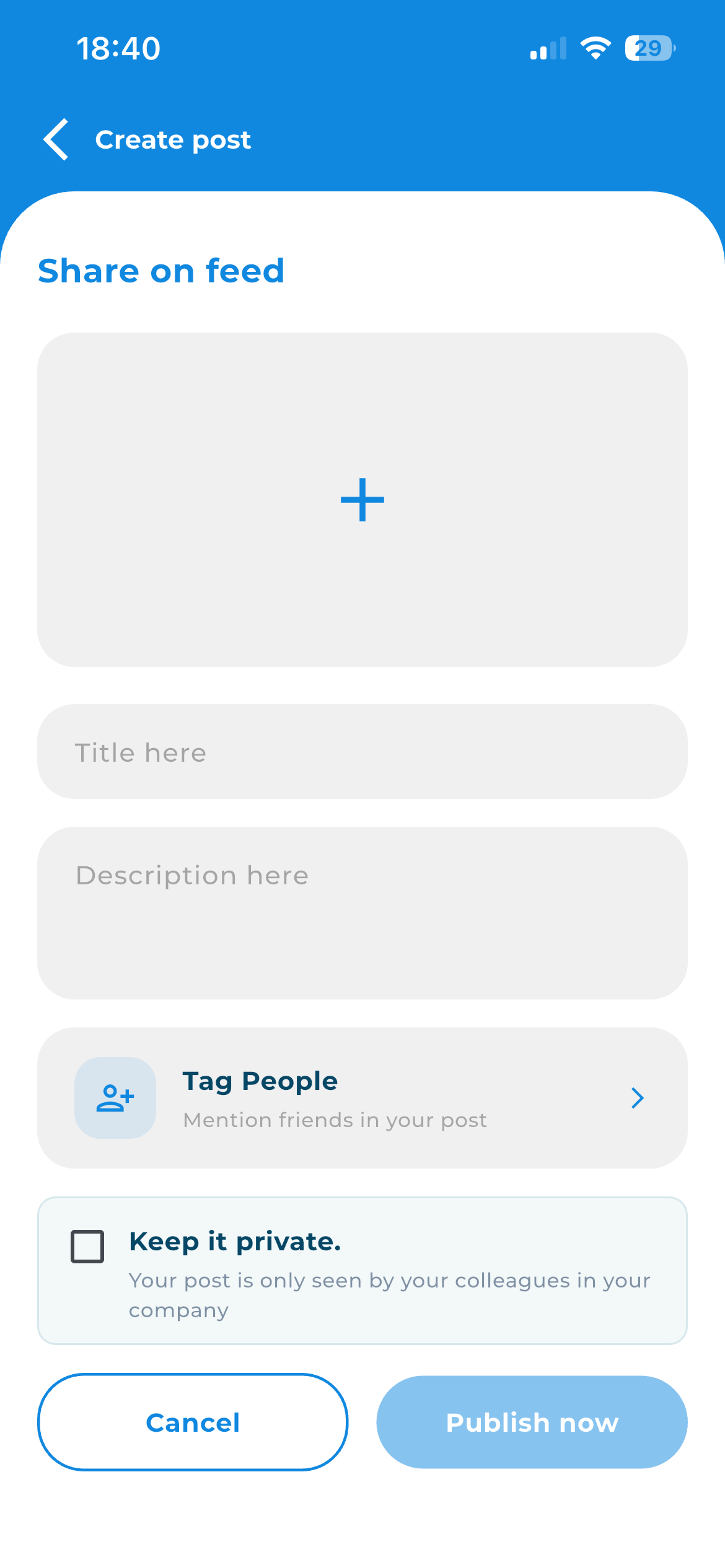
The existing experience presented several actions and options at once, creating unnecessary visual competition around the core task: sharing something with the community.
Make the content itself the primary interaction. Users can create:
• Text-only posts
• Media-only posts
• Text + media posts
Additional actions such as tagging colleagues remain available without competing with the main publishing action.
I simplified the experience around one main goal: make it as easy as possible to create and share content.
The redesign gives the content field and publishing action more visibility, while keeping the other options available without letting them distract from the main action.
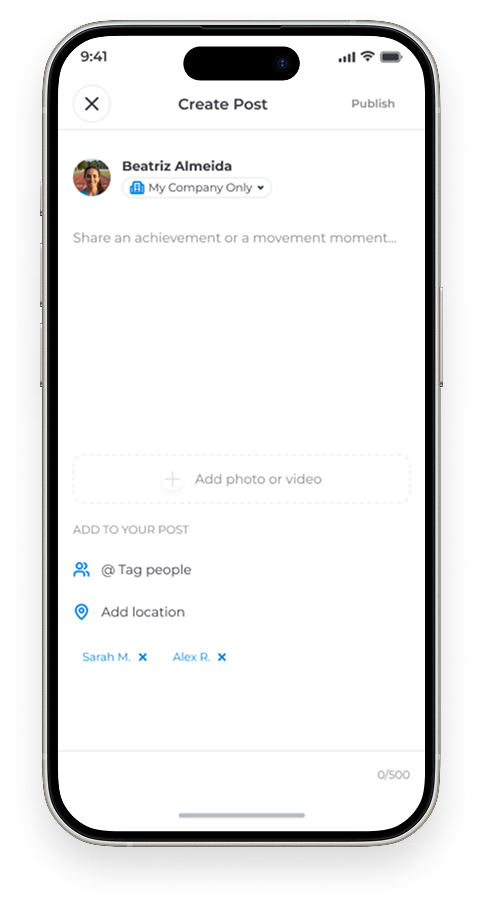
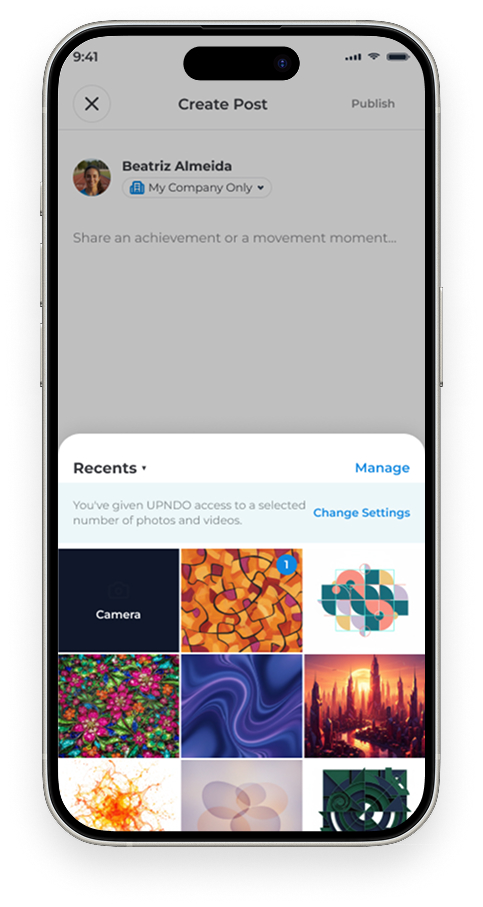
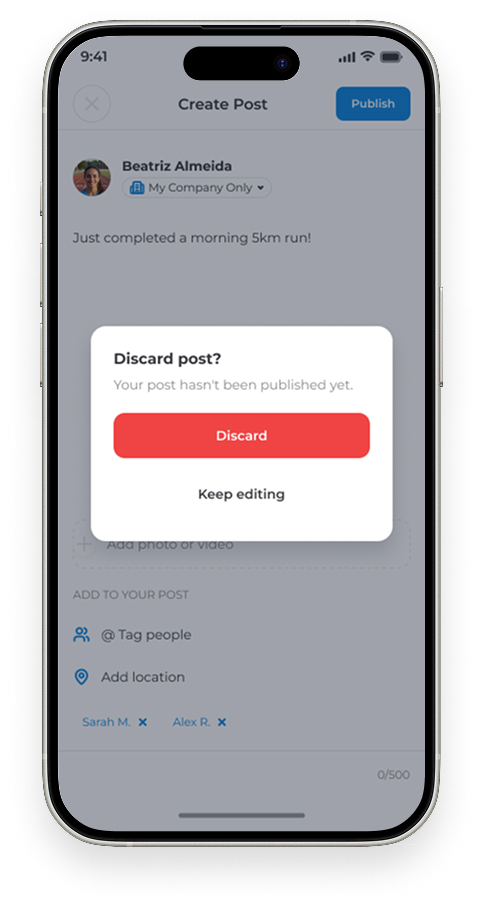

The new experience supports different types of posts while keeping the interaction lightweight:
Write -> Add media (optional) -> Publish
The result is a simpler creation flow that makes participating in the community feel more immediate and approachable.
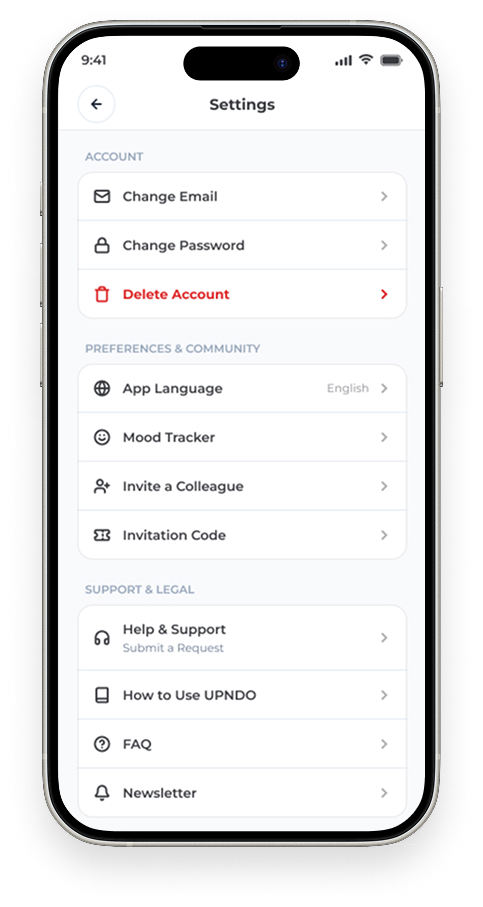
The audit also revealed an opportunity to rethink how functionality is grouped.
The existing menu includes product features alongside account-management functions such as:
• Mood Tracker
• Invite a colleague
• Newsletter
• FAQ
• Contact Us
• Language
• Change password
• Delete account
• Log out
The issue wasn’t necessarily the number of options. It was that core product features, support, and account settings were all grouped together, making the navigation harder to scan and understand.
I saw an opportunity to separate these areas more clearly so users could find what they need without having to sort through unrelated options.

Throughout the redesign, I used five principles to evaluate decisions.
Make it easier for users to get into the product, understand what they need to do and complete key actions with less effort.
Create stronger hierarchy so users can quickly understand what they're seeing, what matters and what they can do next.
Make movement, community participation and real-world impact more visible, meaningful and rewarding.
Together, these changes helped bring the different parts of UPNDO closer together, making the overall experience clearer, easier to navigate, and more engaging.
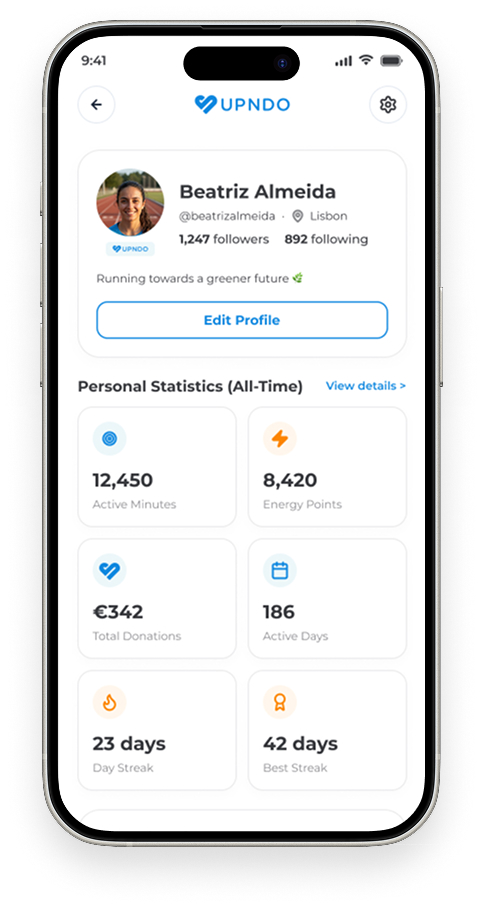
After auditing the existing experience and redesigning its key touchpoints, I brought the different parts of UPNDO together into a clearer, more cohesive, and more intentional experience.

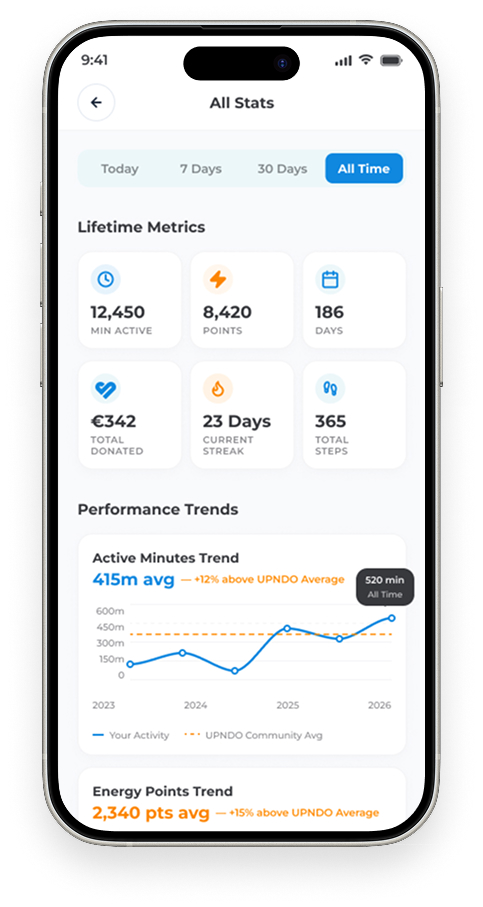
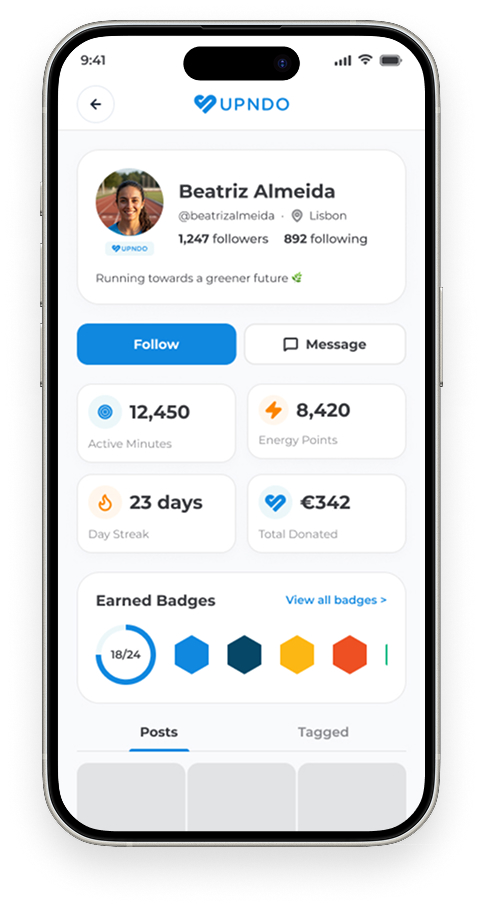
A shorter, more focused onboarding experience.
Personal progress, activity and community brought together in one daily hub.
Leaderboards, challenges and social interactions designed to encourage action.
Donations and causes structured around understanding impact and taking action.
The work helped establish a clearer product direction: UPNDO is not just a tool for tracking activity, but a platform that connects individual wellbeing with collective participation and social impact.
Key journeys became simpler and more focused, reducing unnecessary steps and visual complexity.
Community, competition, and real world impact became more visible parts of the daily experience, giving users more reasons to come back and participate.
I created and applied a design system across the product, bringing consistency to typography, spacing, colors, components, and interaction patterns.
The redesigned experience and design system created a more cohesive foundation for future features, making it easier to continue evolving the product over time.
The redesign created the foundation for the next evolution of UPNDO, with opportunities to make the experience even more engaging and rewarding.
Introduce badges to recognize milestones, achievements, and different types of participation, giving users another way to see and celebrate their progress.
Expand gamification beyond rankings and challenges with new mechanics that encourage participation, consistency, and friendly competition.
Explore an in app marketplace where users can redeem rewards and discover products or experiences connected to their activity and achievements.
The next step would be to test the redesigned experience with real users and behavioral data. This would help identify where the new flows are working well, where friction still exists, and what could be improved in future iterations.
This project reinforced an important lesson for me: good product design is often less about adding more and more about making what already exists work better together.
UPNDO already had many of the right ingredients: activity tracking, challenges, social features, impact, and gamification. The challenge was creating a clearer relationship between them and making the overall experience easier to understand.
Throughout the audit and redesign, I started looking beyond individual screens and asking:
• What is competing for attention?
• What is creating unnecessary friction?
• What should users understand or do next?
• How can one part of the product strengthen another?
The result was more than a collection of redesigned screens. It was an opportunity to rethink how the different parts of UPNDO could work together, with movement, community, and impact supporting each other throughout the experience.
The biggest takeaway for me was learning to look at a product as a connected system rather than a collection of individual interfaces.
